This AutoCAD tutorial will talk about different AutoCAD linetypes and their usage in AutoCAD drawings.
In order to create the professional AutoCAD drawings you have to use the different AutoCAD linetypes.
What is AutoCAD Linetypes?
The linetypes define the types of AutoCAD lines. By setting a linetypes you will define the repeating pattern of dashes, dots and blank spaces of a line or curve. Apart from straight lines and curves you can define line types for hatching as well.
How to Use AutoCAD Linetypes in Drawings?
You can set the AutoCAD linetypes either from “Layer” or from the property window:
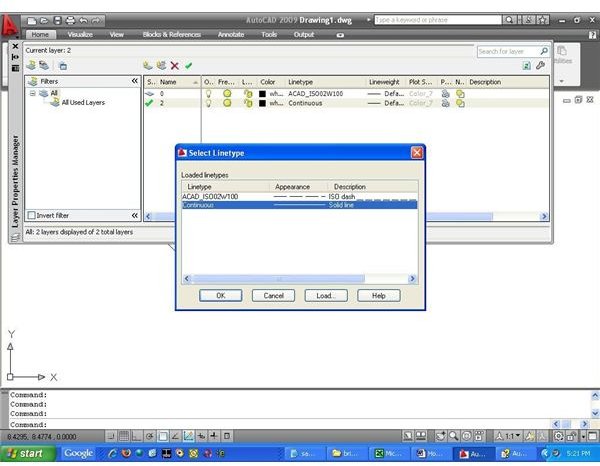
- Setting linetypes by layer: Here you will change the linetypes from the “layer property manager” window. You need to type the word layer in the command prompt of AutoCAD and the layer property manager window will open. You will see the different layers of the drawing. Click on the linetype of the specific layer for which you want to change the linetype. The “Select Linetype window” will appear like below:
Now, you can either select a linetype directly from here or can load other line type and then select the same.
- Setting Linetype from Property: This is a bit simpler method than the previous one. For changing linetypes of any number of selected drawing entities (lines, curves, hatch lines) just right-click and select “Properties”, the “Properties Window” will appear. Now change the linetype from bylayer to the desired one.
In the same “Properties Manager” window just below the Linetype there is Linetype Scale. You can change the density of the dash and/or dot pattern by changing the Linetype scale value.
Conclusion
Different AutoCAD linetypes are used very often in the industry. You can change the linetypes either from the Auto CAD “Properties” window or from the “Layer Properties Manager”. You can even change the “Linetype Scale” from the “Properties” window. On the other hand if you need to change linetypes of a particular layer then you should do it from the “Layer Properties Manager”.