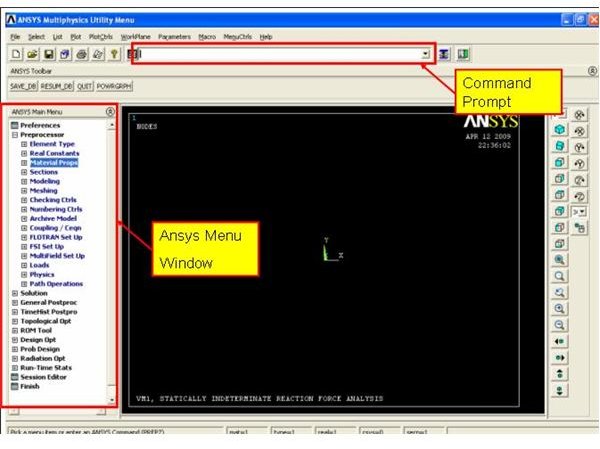
Any Finite Element Analysis (FEA) can be performed in two ways in Ansys: by menu options and by entering codes in the Ansys command prompt. I like the second method because this method is independent of versions.
Brief Overview of a Computer Aided Engineering (CAE) analysis
- Preprocessing: You will define geometry and boundary conditions and material properties in this stage. In Ansys code /prep7 is use to start preprocessing.
- Solution: Solver solves FEA equations in this stage to get result. /solu is the code in Ansys to start solution.
- Post processing : Different kind of plots and graphs are created in this stage to present the FEA result. /post1 is the code for starting post processing in Ansys.
Different Sections of Ansys GUI
Click on the snapshot to enlarge:
Any FEA in Ansys could be performed by using either command prompt or menu options or mixture of both.
Defining Material Properties Using Menu Options
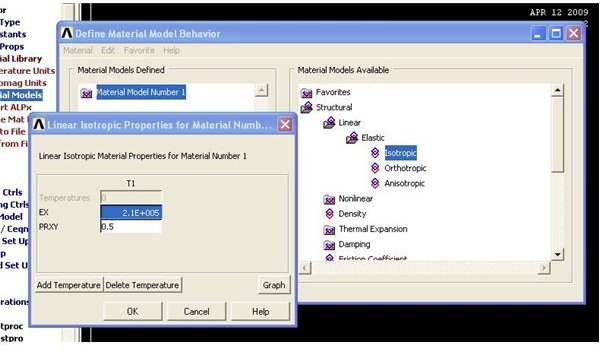
- Go to Main Menu → Preprocessor → Material Props → Material Models
- The Define material model behavior dialogue box will open.
- From the right hand side, select suitable material properties and enter values.
For example if you are doing linear static analysis, select and enter material properties value as below (Click on the snap to enlarge):
- Similarly you can add thermal, non linear material properties, etc.
List of Some Important Abbreviations Used for Defining Material Properties in Ansys
EX, EY, EZ: Modulus of Elasticity
NUXY: Poisson’s ratio
DENS: Density
GXY: Shear Modulus
ALPX, ALPY, ALPZ: Coefficient of thermal expansions
C: Specific heat
KXX, KYY, KZZ: Thermal conductivities
Defining Material Properties Using Command Options
- The syntax for defining material properties in Ansys is MP, Lab, MAT, C0
- MP is the code recognized by Ansys for defining material properties.
- Lab is the label or types of material property you want to define. The lists of abbreviations just explained above are used to select Lab. For example MP, EX, 1,21E6 defines the modulus of elasticity as 21x10^6.
- MAT is reference number of material. If you use one material throughout the CAE analysis then the value will be 1.
- C0 is the material property value.
- See the code and explanations below for more clarity:
/PREP7
/TITLE, new analysis
ANTYPE,STATIC
MP,EX,1,20E6
MP,NUXY,1,0.6
The first line is for entering into preprocessing.
Second line is the title of the FEA; the same name will be displayed at the bottom left corner of GUI .
Third line tells about the type of analysis.
Fourth line is for defining Modulus of Elasticity as 20 x 10^6.
Fifth line is defining Poisson’s ratio as 0.6.
Conclusion
Providing correct material properties input is very important for getting correct FEA results from ANSYS. Material properties can either be defined by menu options or by commands prompts or by mixture of both. I recommend learning command based FEA, as this is independent of versions of ANSYS.
Related Reading
- Ansys vs. Pro Mechanica : Ansys and Pro Mechanica both are very popular CAE or FEA tools. Ansys as well as Pro Mechanica both having strength in different areas. Where to use Ansys? Where to use Pro Mechanica? Why?
- How to Use Standard Shell Idealization in Pro-Mechanica : Midsurface shell option will allow you to create shell from the solid model for Pro Mechanica. We will discuss where we can use this option and where we can not.