Lots of time during your pro engineer modeling, you would be required to check/measure lots of parameters of your model. Model analysis option will be handy for this. We will discuss about model analysis in this article.
The model analysis tool/option of pro engineer is especially useful when you are doing auditing or QC of your model. While doing QC of your model sometimes it will be difficult to visualize the problem area and sometimes you can not just trust your visual inspection , you have to actually require some kind of data about the quality parameters of the model, the model analysis is the tool for then.
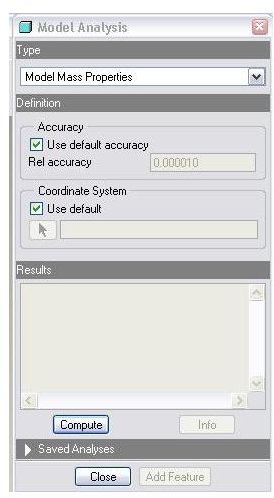
Let’s see how to use the model analysis and what options available in that. You will be going to analysis>model analysis and you will be seeing a window popping up like below:
Observe the drop down list below type, all types of model analysis that could be performed using pro engineer are available at the drop down list. Important among them are:
Model/assembly mass properties: You will be in position to know the position of centre of gravity (CG), total mass etc of your model from here, much before the actual manufacturing of it. This is important in terms of getting rough idea of the material costs of the product and also the loading behavior. You have flexibility of using default coordinate system or go for any other datum coordinate system by checking or un-checking the check box just below **coordinate system.**Click on compute to get the mass property results, typically you will get mass, CG, mass moment of inertia, radius of gyration etc. By clicking info, the results could be obtained at separate window and the analysis could be saved as well for future use.
X-sec mass properties: This option is useful when you are dealing with cross sections.
Let’s see first how to create cross sections in pro engineer. For creating a cross section, you will be following like this: view>view manager>X-sec>new. You will be seeing a menu with some options for creating cross section. The simplest way of creating cross section is go for planer option and click on a plane through which you want to see the section. You can give a name to the cross section or else pro engineer will take default name as X-sec0001.
Once you have done with creating cross section, you can analyze mass properties with respect to that cross section. You will be selecting the cross section with respect to which you want to see the model mass properties; alternatively you can even select a plane, in order to tell pro engineer about the cross section you are interested. Click on compute to get the X-sec mass properties. You will typically get centre of gravity of the section, area moment of inertia, polar moment of inertia etc.
- One sided volume: During your designing work sometimes you might be interested to know the volume at the designated side of a designated plane.
- Pair clearance: This is a very important tool for doing QC of your model, clearance or interference between any pair of entities, models, cables could be checked by this option.
- Global clearance: Here you can specify the amount of clearance, and by computing pro engineer will show the pair of parts, between which the clearances are less than or equal to the value specified by you.
- Short edge: Here you can check the edges of a part which are having length shorter than what you have specified.
- Edge type: This option determines the type of the selected edge. Whether the edge is line or arc.